Online booking, client notes, payments and a real business phone line, all in one plan. No fees taken from your sessions. No upgrade tiers. Every feature, from the first day.
Plus texts, calls and AI at the provider's own price, nothing added. See what texts add to a session.
Have you thought of anything a program could do to make your work and life better? We probably have it. If we don't, we'll build it fast.
It's like having an assistant at the front desk, included in your $20.
It's like having an assistant for pennies a session.
Clients leave a voicemail while you work. You get it as a text, written out.
Switch on the setting "Book me back to back" and your calendar does it. It only offers the hours, pairs and breaks you decide.
Reminders go out at the right time, including texts, which clients don't ignore, and every client confirms on the day.
Everything works from the first day with no team setup. Your schedule, your rules, your clients, your number.
Two or three of you share one office for the same $20, under $7 each with three. Clients book any of you from one booking page and one business number.
Each therapist sets their own hours, breaks and daily limit, keeps their own session notes private, and gets paid to their own Zelle, Venmo or card account. Texts from your clients come to you, not to everyone.
Couples sessions book two of you at once, each keeping your own client. When the practice owner is away, a colleague covers the office's texts until the date set.
Larger team? Tell us about your practice and we'll talk.
Zelle is one tap in your checkout, next to cash and card, so you never type it in again. Whatever you're paid with most often sits on top as the default. Your client pays you directly and the money is in your bank the same day. No processor in the middle, no percentage gone. We advise using Zelle with a business account, to keep personal and business income and expenses separate.
Why keep paying a middleman 2.5–3.5% of every session? On a $120 massage that's $3 to $4, every time, income that never reaches your pocket. Some booking apps even add a fee of their own on top for the service; Anataxis doesn't. Get paid all that you work for. And cards are still there for when you need them.
Venmo works the same way: one tap at checkout, and on the client's phone the amount is already filled in. Venmo charges business accounts its own small fee (1.9% + 10¢), paid to Venmo, not to Anataxis; Anataxis adds nothing.
Most practices end up with a mix: Zelle from regulars, Venmo from younger clients, a card from the client who forgot their phone, cash now and then. Add cards next to Zelle, Venmo and cash by connecting your own Stripe or Square account, or keep the one you already have. They charge their standard fee, and Anataxis adds nothing on top. Anataxis doesn't earn a cent from your payments.
Want part of it upfront? Ask for a deposit before a new client's first session, as a set amount or a percentage of the price. Or ask it for every booking, or just for certain services, like couples or a two-hour session. Your client pays it by Zelle, Venmo or card as they book, and the rest is settled at checkout. Gift certificates work the same way.
Card and Venmo fees are paid to the card and Venmo companies, not to Anataxis. Anataxis takes nothing from your payments. Move the sliders to match your practice.
Other booking software adds its own fee on top of the card network's for the service. Anataxis doesn't. Typical examples from each vendor's own pricing page, checked October 22–24, 2026 (rates change): Vagaro lists 3.5% + 19¢; MassageBook 2.6% + 15¢; Square Appointments 2.9% + 30¢. Connect your own Stripe account to Anataxis ... or Square! Either way you pay their standard online rate of 2.9% + 30¢ and nothing more. On a $120 session, Vagaro's 3.5% + 19¢ is $4.39 against $3.78, about 60¢ more every time.
Most booking apps send reminders from a number your clients can't write back to. With Anataxis you get your own local business number. Reminders go out from it, and when a client replies "running 10 minutes late," your phone buzzes with a notification, the message is waiting in your inbox in Anataxis, and you answer it right there. The number and texting are optional: without them, Anataxis sends everything by email and works just the same.
Clients can call it too. When you're mid-session with your hands on someone's back, the caller leaves a voicemail, and a few minutes later you get a text with the message written out. Read it between sessions, no listening required, and call or text back from the same number.
Calls ring through to you, and your business number shows on the client's screen when you call out. Your personal cell stays private.
Already have a business line, or use your own cell for clients? You may not need Anataxis's texting number. Email confirmations and reminders are included either way.
Still, you can keep your number and set your phone to forward the calls you can't answer, like when you're in session, to Anataxis's AI assistant. It answers questions and books, moves or cancels appointments from your real calendar. You pay only the call minutes and the forwarding line, at cost. (The phone assistant is coming next, with the AI levels below.)
What it costs: $3.10 a month for the number, plus the texts and calls you actually send, at the carrier's price. In our own practice that came to about 12¢ a session. Work out yours
I still practice, after 37 years. I built Anataxis on what I've found matters: the least time each day on things I shouldn't be doing, and the most physical comfort and energy for the work itself.
I tried four booking programs before we built this one. None of them could book my day the way my hands and my life need it. I built that as the center of Anataxis, and your clients only ever see the times you chose to offer.
Two sessions in the morning, two in the evening, and a two-hour lunch? Set it once. Every weekday can be different.
New clients get the time right next to a session you already have, or one with room for a full session in between. No stray 40-minute holes.
Not a fixed buffer: your break follows whenever your clients actually booked, so you always get it.
My energy and my body change from week to week, so I change this number often. Once the day is full, it stops taking bookings.
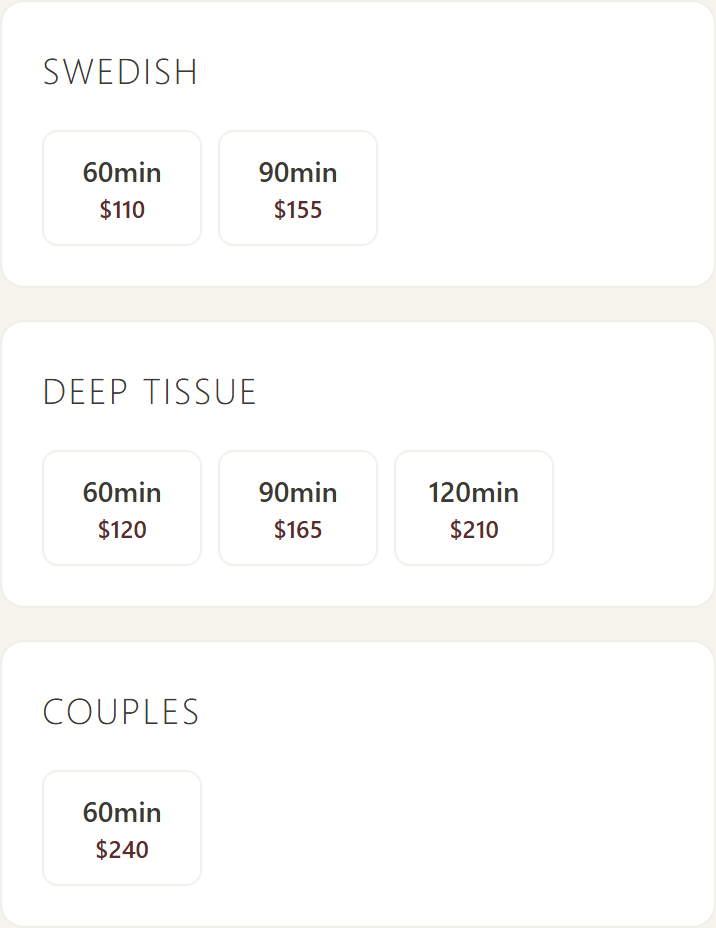
Each kind of massage is one card with every length and price side by side. Your client taps one and moves on to picking a time. You set a service up once; add a 75-minute option or change a price and the booking page follows.
Example prices.
Every length of every service carries its own recovery time: 15 minutes after a 60, 30 after a deep 120. You set each one.
And of course you can block off any time you like: a day, an afternoon, a weekly slot for your own bodywork, or the three-week vacation you know you deserve.
A dentist appointment in your Google Calendar closes that slot on your booking page. Or skip Google and use Anataxis as your personal calendar: add a block with a note, as I do. It stays private, and clients only see the time as taken.
At-home sessions with travel time built in before and after, priced by distance.
“I spent years working around the booking app instead of with it. Then they asked me for $75 a month. Nothing in that plan was what I'd been asking for.”
As a therapist, I felt boxed in. I couldn't text my clients back. I couldn't take Zelle, the way I wanted to get paid. Every useful feature sat one tier higher, and every tier came with a cut of my card payments.
So we built our own. Anataxis runs our practice every day, with thousands of real bookings behind it. Now we're opening it to other therapists, at a price that covers the servers and keeps improving it.
George Rodafinos · massage therapist for 37 years, DeeperLayers Massage, Los Angeles
“Clients book themselves into the times I want, and the day-of confirmation means I rarely get a no-show. I spend my evenings off my phone now.”
Alexis Dacosta, CMT · DeeperLayers Massage, Los Angeles
Most scheduling programs show a starting price, then keep newsletters, text messaging or couples booking for a bigger plan. Anataxis has one plan with everything in it, for $20 a month.
We don't sell you the extras. We connect you to them at cost: texts, calls, card payments and AI, billed at the provider's price with nothing added.
Published US list prices, read on each vendor's own pricing page on October 22, 2026, monthly billing, one therapist. Vagaro full = $30 base + $10 forms + $20 text marketing. MassageBook full = Clinic, the only plan with couples booking and a waitlist; AMTA members see 25% off ($74.25). Square earns on card processing. Card processing fees are extra with every competitor.
Showing Acuity, MassageBook and Square. Pick yours to see it beside Anataxis.
Clients pay you directly. The money never passes through us.
Your own Stripe or Square account at their standard rate. Nothing from us on top, and Zelle costs nothing at all.
Your own business number. Clients write back, and you answer. Acuity, MassageBook and ClinicSense send reminders only. Where real two-way texting exists, it runs about $45 a month on Vagaro and $200 on Mangomint.
The $20 plan is the whole product. Whatever we build next lands in it at no extra cost. Only per-use costs (texts, calls, card fees, AI) are passed on, at the provider's price.
Acuity and Jane have no newsletters at all. MassageBook keeps them for its $59 plan and up, Square for its $49 plan. In Anataxis every office gets them, with your logo and colors, and every word is yours to change.
Every feature exists because we needed it on a real workday, and we keep adding new ones from ideas that come up during a busy week.
Clients pick a service, therapist and time. Your booking page has its own address: put it on your Google listing, Instagram and Facebook, no website needed.
Your logo, colors and fonts, matched from your website automatically. Then fine-tune it by describing what you want.
Import clients and notes from your old booking app's export, free and simple for every office. Duplicates merge automatically.
Encrypted session notes, with a log of who opened or changed each one.
Two-way sync per therapist. A personal event blocks the slot.
Every client confirms by text on the day. In our practice it cut last-minute cancellations and no-shows by 60%.
Sell gift sessions online, paid by Zelle or card.
One person books and pays for both. Each therapist sees it's a couples session, and each keeps their own client.
No website, or no way to edit yours? Build a one-page site on your Anataxis address: about you, a few photos, your services and prices, and a Book-now button. Step-by-step help puts your booking link on Google, Instagram and Facebook too. Not sure what to write? Describe your practice in a sentence or two, and Anataxis drafts the tagline, the about text and the colors for you to approve.
Ready templates on your brand, every word editable. Send a newsletter, a holiday gift offer or a new service to your clients. No charge per email or per contact, and unsubscribe is built in.
New clients fill in their intake before the first session from an email or text link, and it's waiting on their record. Optional: a few follow-up questions about anything they left out, typed or spoken, anything worrying flagged for you to check, and the first lines of your session note drafted from their answers.
Sell session packages, and ask happy clients for a review after their visit.
Sessions, income and returning clients by month, per therapist.
Add Anataxis to your home screen and it opens like an app, with fingerprint or face sign-in. Nothing to download from a store.
We bring your clients, history and notes over from your old program at no charge.
Keep your old program on while you try Anataxis, and re-run the import at the end to pick up anyone new.
Download your clients, appointments and notes whenever you like. Your data is yours, whether you stay or go.
Everything is backed up nightly, with a copy kept off the main server.
Session notes are encrypted, and every time one is opened, changed or exported is logged: who, and when.
We don't claim a HIPAA certification. Client contact details are shared within your office. Each therapist's session notes open only for the therapist who wrote them. Notes brought over from your old program open only for the client's therapist, or for whoever that therapist chooses. Notes are encrypted on the server, and every opening is logged.
AI costs per use, like texts. So it works the same way: you pick a level, you see the cost on your bill at the provider's price, with nothing added. Switch levels any month. All of it is optional: Anataxis works fully without a text plan or any AI, and you can start, change or stop any month.
Included in your $20
about $1–7 a month
about $3–22 a month
Speak your note after the session and Anataxis writes it into Subjective, Objective, Assessment and Plan for you to check and save. Last session's findings and the client's intake are used too, so the note takes a minute, not ten. About 2¢ a note, at the provider's price.
Estimates for a solo practice with about 80 sessions, 60 client texts and 25 calls a month, at the AI and phone providers' published prices on October 22, 2026. The range runs from a standard voice to the most natural one. In development; your request decides what ships first.
Your $20 plan is the same however many texts you send. So we only work out what the texts, calls and AI add to each session, from what our own practice actually uses, at the providers' prices. Nothing is hidden and nothing is added. Card fees have their own calculator, under Getting paid.
Our own practice: 82 sessions of reminders, day-of confirmations, back-and-forth texts, calls and voicemails came to $9.86 for the month, about 12¢ a session, with alerts to our own phones as free app notifications.
Estimates, checked against our own practice: in September 2026 we had 82 sessions, about 9 texts per session counting both directions and a phone bill of $14.32. About 4 of those 9 were alerts to our own phones. Those now come as free app notifications by default (a text goes out only if no phone takes the notification), which leaves about 5 texts per session (3 automatic, 2 of back and forth) and a bill of $9.86. A text averages about 1.5¢: a long text is billed as several, a short reply costs under 1¢. Calls: one for every third session and a voicemail for every seventh, under 1¢ a minute. The $3.10 covers the number ($1), the carrier registration ($2) and texting on the number (10¢). AI levels 2 and 3 are coming next; their range runs from light to heavy use, and level 3 depends on the voice you choose. Your first month is free. Prices read October 22, 2026.
Clients open your booking page, pick a service, a therapist and a time, and enter their details. The appointment lands on your calendar as soon as they confirm.
Reminders go out by text at the right time, and on the day every client is asked to confirm. Their replies show up in your Messages, so you can see who is coming.
Clients buy a gift session or a dollar amount from your gift page and pay by Zelle or card. The gift code goes out as soon as you mark the payment received.
New clients get a link to your intake form when they book. They fill it in on their phone before the first session, and the answers are waiting on their client record.
The same answers sit behind the ? next to each setting in Anataxis, and Iris, the assistant, answers from them too.
Community Care is a sliding-scale program for clients who cannot pay full price. Clients apply on your Community Care page (the /community-care address of your booking site), and you decide on each application.
There are two rates: the Reduced Rate (proof: a pay stub, the first page of a tax return, or an employer letter) and the Community Rate (proof: proof of income or benefits, for example a benefits card or enrollment letter). Each therapist sets their own two amounts, a session price for each rate, on the Community Care screen under 'Your community care rates'. They are not set per service. A client is charged the rates of the therapist they book with.
Changing your rates only affects sessions booked from then on. Clients you have already approved, and sessions already booked, keep the prices they had. Until you save your own rates, you cannot approve new applications: the Community Care screen says 'Set your community care rates first' and links to the setting.
Before you start, open Community Care in the admin menu, set your two rates under 'Your community care rates' and press Save rates.
When a client books online, they are shown an amount to pay right away. At checkout the amount already paid is credited and only the balance is collected. Find it under Settings > Upfront Payment.
Ways to pay: Zelle and Venmo are sent by hand to your handle, which you add in Settings first. With no handle, nobody is asked to pay by Zelle or Venmo. When the money arrives you tap 'Zelle received' or 'Venmo received' on the calendar. Card needs Stripe or Square connected and switched on under Payments, and a card payment is recorded by itself. Until card is connected, clients are offered Zelle only.
Who is asked: the office default is Off, Required for new clients only, or Required for every booking. Each therapist can choose their own under 'My setting' or follow the office default. A service marked 'Always paid upfront' is always asked.
How much: the full price, a fixed dollar deposit (up to $1,000) or a percentage (1 to 99). A service can have its own amount. The client is told the rest is paid at the session.
Who is never asked: only online bookings are asked. Bookings you make on the calendar are never held back, and neither are exchange, Groupon, $0 and package sessions.
Reminder: you can ask to be texted a set number of hours before the session if a Zelle has not arrived. It only reminds you. Nothing is ever cancelled automatically.
The 'Booking Deposits' box under Settings only points here now: card deposits are set on the Payments page and Zelle or Venmo upfront payment under Settings > Upfront Payment.
The window: under Settings > Cancellation Policy, 'Cancellation Window' sets how much notice a client must give: 12, 24, 48 or 72 hours. 'No late fee' (0) turns late fees off. Until you choose a value, the office default of 24 hours applies. The booking and cancel screens tell clients this same number of hours.
Who is charged: a client who cancels inside the window owes half (50%) of the service price. Only clients who have already had a completed session are charged; a first-time client never is. If you cancel a session yourself, nobody owes anything.
The hold and the rebooking rule: the fee is not owed right away. It is held for 4 hours (unless support changes that) and shows on the client's profile. If in that time the client books again, or still has another live booking on the same day as the cancelled one, the fee is voided automatically and the profile keeps the reason. A rebooking with either therapist counts. A rebooking that was itself cancelled does not count.
After the hold: if nothing rescued the fee, it is added to what the client owes and is shown to you the next time they book, so you can collect it by hand. If the office has turned on automatic charging and the client has a saved card, the card is charged instead; a declined card or no card falls back to the owed note. You can waive a fee at any time.
With this switch on, a client saves a card while booking. If they then miss the session (a no-show) or cancel inside your cancellation window, the saved card is charged 50% of the session price.
It is a per-therapist switch, so each therapist decides for their own clients.
Cards are saved with your connected card processor, Stripe or Square, so connect and switch it on under Payments first.
Your cancellation window decides what counts as a late cancel (see 'Late-cancel window and rebooking'), and a rebooking still voids a late-cancel fee in the hold time. If a card is declined or none is saved, the fee is shown as owed so you can collect it by hand.
After someone books an office session, the app asks them to confirm shortly before it: a text asking them to reply YES (or tap a link to decline), or an email when there is no usable US phone number.
Timing: by default the ask goes out 90 minutes before the session. First-time clients also get a confirmation email at that moment. A booking made inside that window is asked straight away.
First-time clients: if they are still unconfirmed 45 minutes before, a final text warns that their reserved time may be forfeited. Returning clients get the one ask only, with no final warning.
You: if there is still no answer 30 minutes before, you get an alert (as a text or app notification, as you chose under Alerts) telling you to follow up, with their number if your setup says to phone them. When a booking is made late, the steps slide so the client has at least 30 minutes to answer, and an alert is not sent when fewer than 15 minutes remain.
At-home sessions are never asked to confirm. Nothing is cancelled for you: you decide what to do about an unconfirmed session.
The timing is set per therapist under Settings > Confirmation timing: when the ask goes out, whether first-time clients get the last warning and when, when you are alerted, and whether the alert tells you to phone the client.
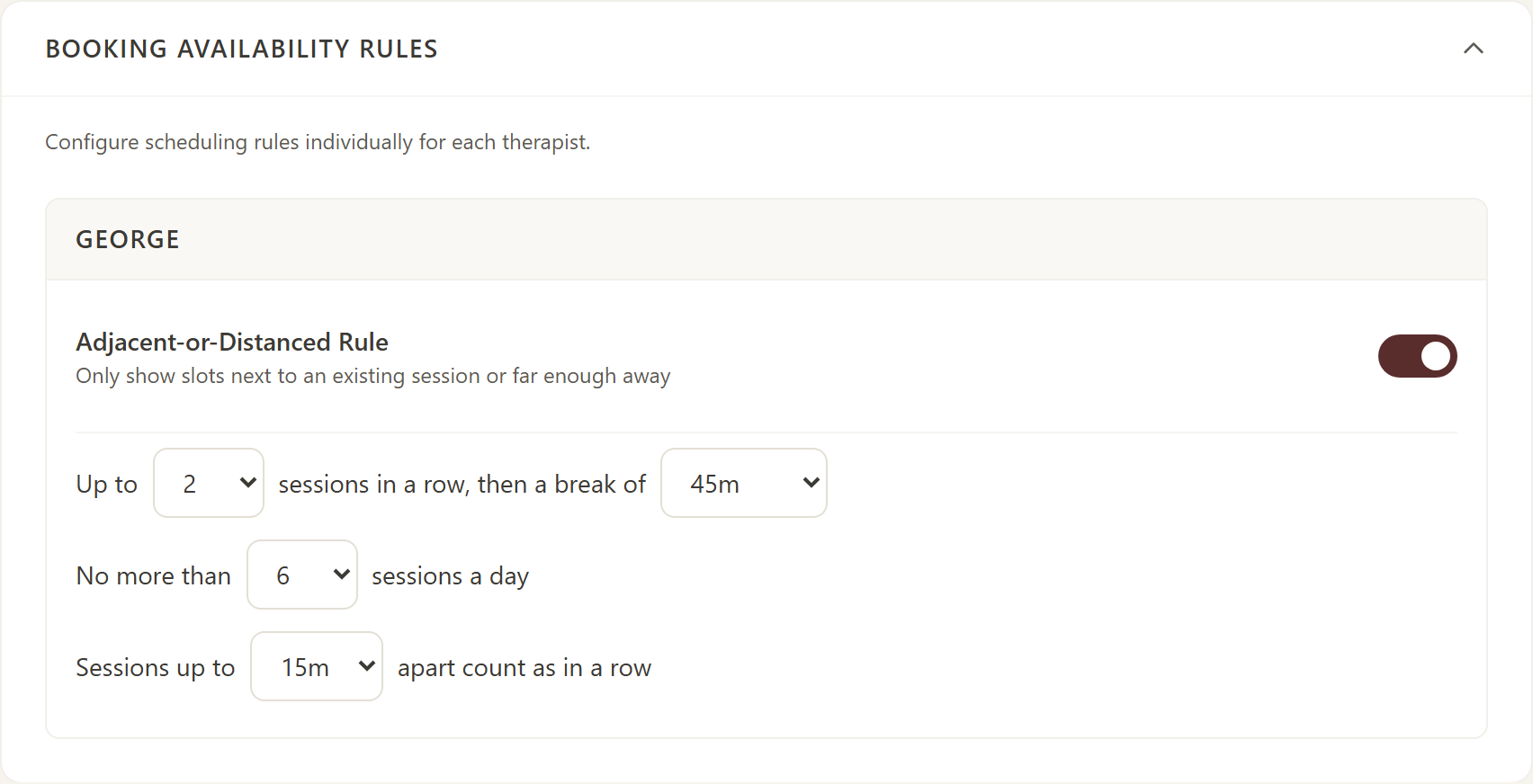
Find these under Settings > Booking Availability Rules. They are set for each therapist separately.
'Up to N sessions in a row, then a break of M minutes': sessions that are less than a set gap apart (15 minutes by default, set in 'Sessions up to ... apart count as in a row') count as one run. Once a run reaches N sessions, no times are offered for M minutes before or after it. The defaults are 3 in a row and a 30-minute break.
'No more than X sessions a day': once a day has X active bookings, no more times are offered that day. The default is 6.
If you switch off the Adjacent-or-Distanced Rule for a therapist, the in-a-row and break limits stop applying to that therapist as well. The daily limit still applies.
These rules only decide which times are offered. They never move or cancel a booking that already exists.
With the Adjacent-or-Distanced Rule on (Settings > Booking Availability Rules), a time is offered only in two cases. Either it starts right after a booked session, or ends right before one, within the 'count as in a row' gap (15 minutes by default, counting the buffer after each session). Or it is at least your break length (30 minutes by default) clear of every session that day.
Times in between are hidden. With the defaults, a time 15 minutes or less after a session's buffer ends is offered, a time 30 minutes or more after is offered, and a time 20 minutes after is not. That keeps your day from filling with short gaps.
On a day with no bookings yet, every free time is offered. The rule only starts to matter once there is a booking that day.
Switch it off for a therapist to offer every free time. That also turns off that therapist's in-a-row and break limits.
Turn it on under Settings > At-Home Pricing with the 'New at-home pricing' box.
When it is on, an at-home session costs the office price of the service plus $40 per person, plus a travel fee from the real driving distance: 0 to 5 miles is free, 5 to 10 miles adds $20, 10 to 15 adds $40 and 15 to 20 adds $60. Linen is an extra $25. There is no rush-hour or after-hours fee.
The client has to enter a full street address (number, street, city and ZIP). The app works out the distance itself, so a client cannot type a distance. An address more than 20 miles away cannot be booked online.
Community Care rates and Groupon sessions do not apply to online at-home bookings.
Bookings you create yourself on the calendar are not affected either way. When the box is off, your earlier at-home pricing stays as it was.
At-home clients get the booking-confirmation text but no before-session reminder texts and no confirmation ask.
A couples reservation creates two linked bookings, one for each person, with two different therapists at the same start time. A time is offered only when at least two therapists are free then.
To book online, the person booking gives their own details and the partner's first and last name. The partner's email and phone are optional; a partner with no email is saved without one and flagged so you can complete their details later.
On the calendar you can choose both therapists. If you choose one, the app picks the other from those free. If you choose none, the app picks two and assigns them at random.
Paying upfront: under Settings > Upfront Payment, 'Couples pay' is either 'One payment for both' (the couple pays the first therapist once and the second booking is marked covered) or 'Each client pays their own therapist' (each booking has its own amount and its own therapist's handle). Couples are asked upfront by Zelle or Venmo, not by card.
At checkout, finishing one half finishes the other. You choose whether one person pays for both or each pays their own bill.
Packages: open the client's profile, go to Session Packages and choose Add package. Enter the number of sessions, the total price, the therapist, optionally one service (blank means any service) and how many days it is valid (60 by default). The form shows the price per session, which is the total divided by the sessions.
New bookings with that therapist (and service) use the package automatically at that per-session price until it is used up or expires. Add-ons and the at-home fee still add on top. 'Apply to upcoming bookings' re-prices bookings the client already has. Cancelling a booking gives its slot back. Nothing is texted or emailed to the client, and package sessions are not asked for upfront payment.
A service set up as a package (a '5X' service, say) creates the client's package itself the first time it is booked.
Gift cards: buyers order on your Gift Certificates page, either a dollar amount from $25 to $1,000 or a specific service, and pay by Zelle, Venmo or card as you offer. A gift paid by Zelle or Venmo stays inactive until you press 'Mark paid'; a card payment activates once the card processor confirms it. The buyer gets a link to pass on, and the recipient claims the gift with it.
Redeeming: the gift code is used when booking or at checkout. A dollar gift reduces the bill and keeps whatever balance is left; a service gift covers that service. If a booking a gift paid for is cancelled, the gift is given back. A no-show keeps it spent.
You can also create gift cards yourself under Gift Certificates in the admin menu, with an optional expiry date.
Whose notes: each imported note file is assigned to one therapist. That is the therapist you pick when uploading, otherwise the client's preferred therapist, otherwise whoever uploads. Other therapists do not see these files at all, not even in the list.
Sharing: the therapist the notes belong to can share one file, or all of that client's files, with chosen colleagues, and can take the sharing away at any time. Only the owner can share or delete. Sharing a client's notes with another therapist needs that client's consent, so get it before you share.
Files are stored encrypted when the office has set an encryption key.
Access log: every time a note is opened, changed, exported, deleted or restored, the app records who did it, when and from where, so you can see who has looked at a client's notes.
Find this under Texting in the admin menu.
Getting a number: enter an area code and pick a number. It costs a monthly price at cost, plus a few cents per text segment, passed through. If you already have a number on the Telnyx account this server uses, choose 'Bring your own number' and enter it with its messaging profile ID. To bring over a number you already use, such as a Google Voice number, use Move my number, which places a porting order that the carrier completes.
Carrier registration: US carriers require every business texting number to be registered (A2P 10DLC) before it can text clients. The platform handles the filing for you. Until it is done the number shows 'Registration pending', and texts may not be delivered. The carrier charges a one-time registration fee, passed through at cost with nothing added.
The 'Texting is on' box switches texting on and off. Releasing a bought number gives it back for good, and clients who reply to it will no longer reach you.
Find this under Settings > How alerts reach your phone.
The kinds of alert are: new booking, client confirmed, client replied or messaged you, booking changed, cancellation or no-show, incoming or missed call, voicemail, session not confirmed, upfront payment not in yet, gift orders, Community Care and the morning schedule.
For each kind pick App notification, Text or Both. The default is app notification. 'All by app notification' and 'All by text' set every kind at once.
To receive app notifications, open the app on your phone and allow notifications, then press 'Send me a test notification'. It tells you how many devices received it, or that no device is signed up.
An alert sent by app only cannot be lost: if no phone accepts the notification, a text is sent instead. Client messages, replies and unconfirmed sessions are also pushed to your app whatever you choose.
Every text costs money and app notifications are free, so app notification is the cheaper choice for alerts you only need to see.
Anataxis runs our own practice, so we fix what bothers us the same week we notice it. It will keep improving and gaining features for as long as we practice. And none of those features will ever become an upsell. When we build something new, it goes into the plan you already have.
We are always looking for the next feature. If something in your day takes too many clicks, or there's a thing your old booking app never let you do, tell us. Your requests are how Anataxis grows, and we read every one.
Our price for new offices will rise as Anataxis grows, but will always stay very competitive. Join during the launch offer and yours won't: the price you join at is locked for three years, and every feature we add in that time is yours at that price. After that, any change comes with three months' notice and never goes above what new offices pay.
Know a therapist who'd like this? For a limited time, you get 3 free months for every office you bring in, and they get their first month free like everyone.
What you won't find elsewhere, at any price or not at $20: Zelle at checkout, breaks that follow the day you actually got, back-to-back booking, your brand matched from your website, two-way texts on your own number, and newsletters at no charge. See how it compares
First month free. Launch offer: your price locked for 3 years. Beta testers who use it: free during the beta (it closes after a month with 10 active testers), then $15 a month for 2 years.